Congratulations! If you’re here, you’re part of the ever-growing online world of over a billion websites on the internet. You may (or may not) find yourself thinking about what’s next and how you can plan for the future of your website.
A website isn't a one-and-done thing. It's more like a car that needs regular service. There’s a common misconception that websites are done once they launch, and we get it, a website is a huge undertaking so you might be thinking, “there’s more?!”
Picture this: you’ve just driven your brand-new car off the lot. It shines like a diamond, and it smells of fresh polish and leather. Now, would you drive it for years without a single service? No oil changes, tire rotations, or even a glance under the hood? Of course not! Websites, just like cars, need regular maintenance to keep them running strong.
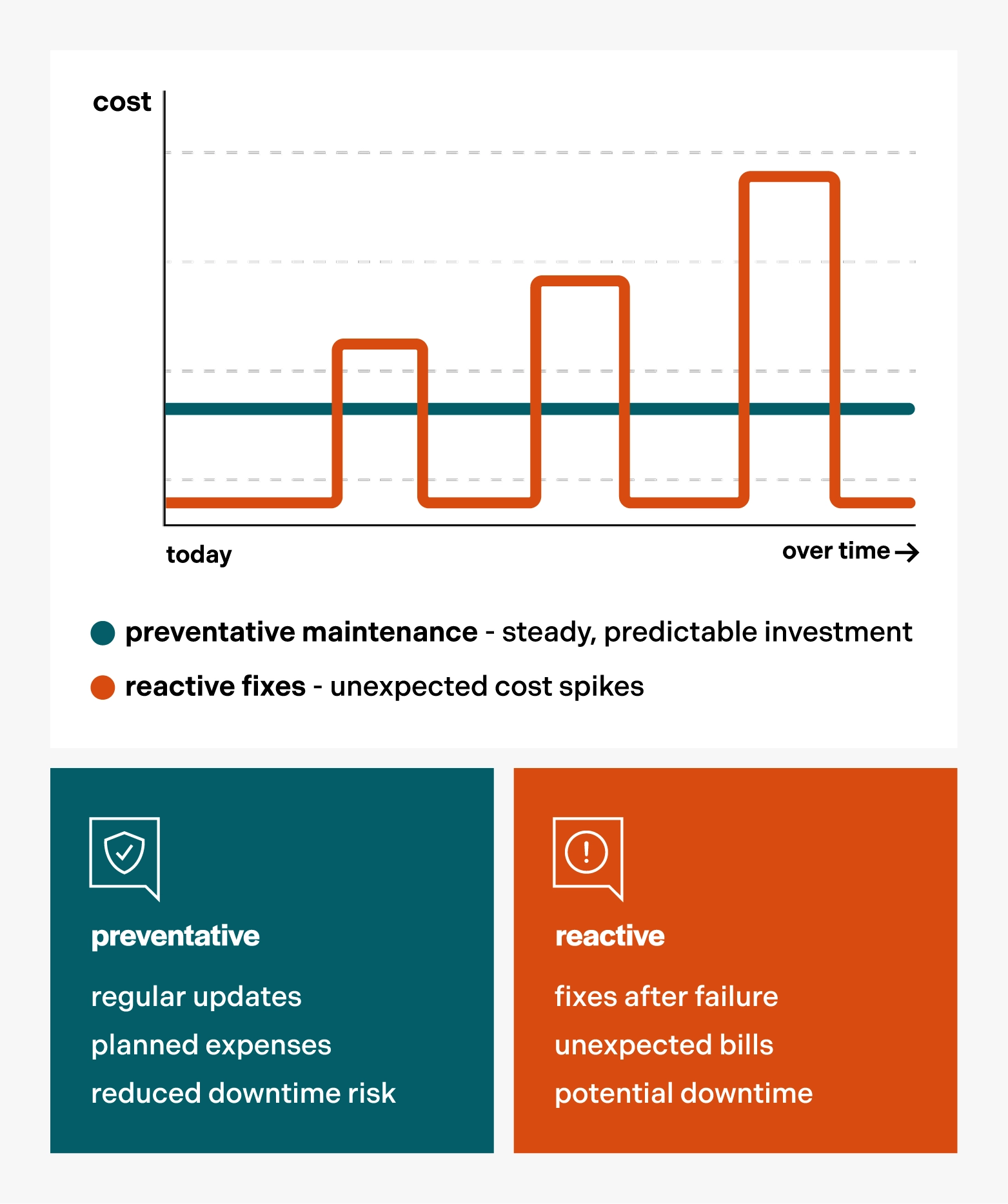
If you forgo the regular maintenance, larger problems will occur that will require a bigger investment down the road. So it’s best to stick with the regular tune-ups to keep the engine running smoothly.
In this article, we’ll take an in-depth look at what web maintenance involves and cover these key areas:
- Technical updates
- Content updates
- Performance updates
- Security updates
- SEO maintenance
what is website maintenance?
Website maintenance is the ongoing tasks that keep your site secure, fast, relevant, and functional. Understanding the difference between maintenance and larger redesigns could save you thousands of dollars.
- maintenance: Routine service that extends the life of your site. Perfect for websites that are already performing well and only need minor updates to stay functional over time.
- redesign: A strategic overhaul usually due to outdated branding, improving UX, reconsidering navigation, or changing the flow of information. You can learn more about the design process in our other blog post.
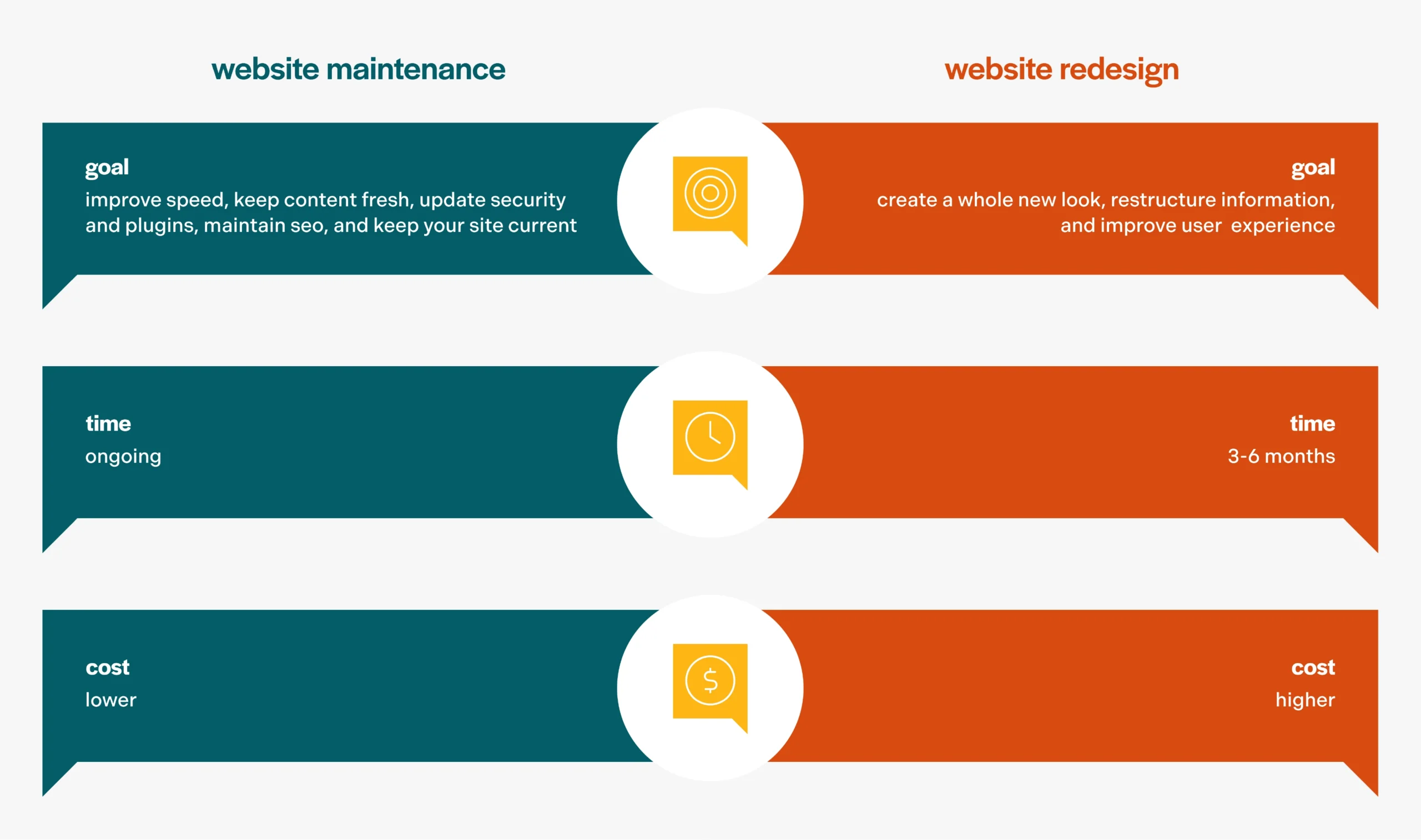
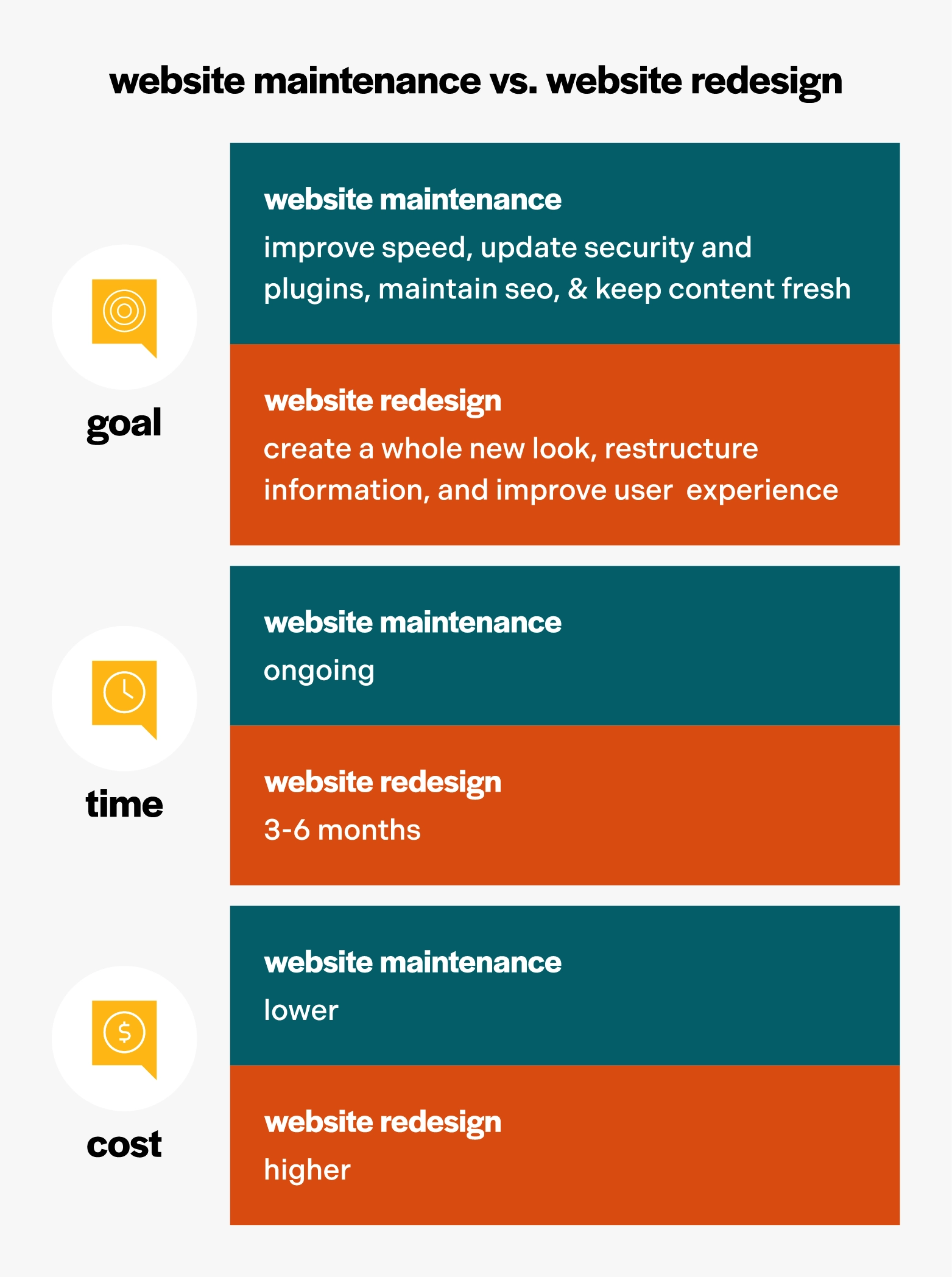
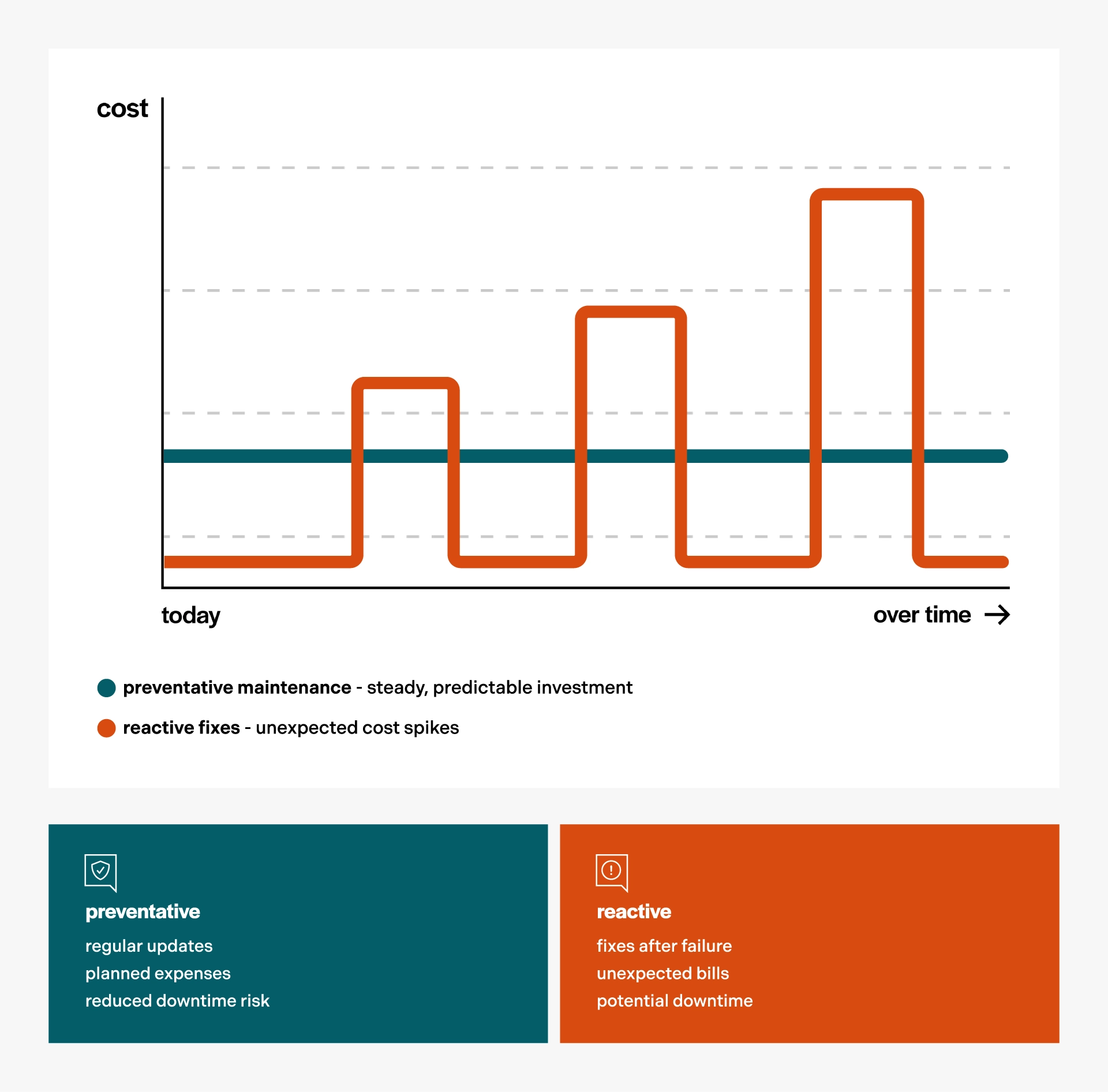
Routine upkeep is far less expensive than repairing a hacked site or rebuilding a website from the ground up. Proactive maintenance tasks can boost your website’s performance and prevent problems before they snowball into costly emergencies.
do websites really need maintenance?
Short answer: Yes, always.
Technology is constantly changing. New smart phones are released annually with ever-increasing capabilities. Browsers update regularly, web standards change over time, and security threats emerge regularly. What worked 5 years ago may not work today.
A great example of a successful browser that didn’t adapt over time is Internet Explorer. In the early 2000’s, Internet Explorer reached an estimated 95% of market share according to ars Technica. However, Microsoft officially retired Internet Explorer in mid-2022, because it had not adapted to modern tech trends or the ever-growing mobile browsing experience.
One other area that needs regular TLC is your content. This includes the images, copy, and information your site displays. Your business isn’t stagnant, and your content shouldn’t be either. Outdated content on a website leads to a bad user experience and reduces your credibility. Keep it updated.
And yes, an old website that has not been properly maintained can actually break down, just like your car. And the cost to fix may be more expensive than you anticipate. If your website isn’t maintained and updated, security risks increase, user experience may suffer, and you may lose customers.
why website maintenance is important
On the surface, the clearest advantage is simple: it keeps your website working as it should. But beyond that, these additional benefits make it an ongoing task well worth your while:
- Security and protection from threats
- Performance and speed optimization
- Smooth user experience and functionality
- SEO and search rankings
- Professional credibility and trust
- Cost savings (by preventing major problems down the road)
what does website maintenance include?
technical maintenance
Keep all website-related software and plugins up-to-date. This ensures compatibility, security, and access to the latest and greatest features.
Perform regular backups of website data and files in case of data loss or a security breach. Having a reliable backup ensures you can quickly restore your site to a previous version.
Monitor your website's uptime to ensure it remains online and accessible to users.
Automated tools can help with some of these tasks, like scheduled backups and uptime monitoring, but others require a skilled human touch.
content maintenance
Outdated content can cause users to lose trust. Content maintenance includes uploading fresh images, writing new blog posts, and updating product and service descriptions to accurately reflect your offering. Refreshing content also signals to search engines that your site is active and current, which results in higher SEO rankings.
Think of this like spring cleaning. Out with the old, in with the new. And be sure to check the corners for cobwebs, sweep the baseboards, and clean up any broken links.
performance optimization
A fast website improves user experience and search engine rankings. Maintenance here involves speed testing on desktop and mobile, image optimization, caching and database cleanup, and mobile responsiveness checks. These improvements help your website load quickly.
security monitoring
Arguably one of the most important areas to keep updated: your site’s security. This not only protects your site; it also protects your visitors' data. Security updates can include malware scanning, SSL security certificate renewal, firewall management, password updates, and regular security audits.
seo maintenance
SEO isn't something you "finish." Google expects websites to be maintained over time. Ongoing SEO maintenance can include monitoring search rankings, updating meta descriptions and titles, fixing crawl errors, maintaining XML sitemaps, and internal linking to other pages. Regularly updating your content is another great way to support your SEO efforts.
ui design updates
User Interface (UI) design is a very important part of your site that sets the tone for how your users will interact with your brand and experience the content of your site. If left untouched, it can begin to look stale, outdated, or may not reflect your latest brand guidelines.
Let’s go back to our trusty Internet Explorer example discussed previously. This is a great example of the consequences of not staying up-to-date with the latest UX and UI trends in the marketplace. It’s best to keep your finger on the pulse so you don’t become irrelevant as Internet Explorer did.
the real cost of neglecting website maintenance
Ignoring your website can actually harm it, your customers, and your reputation. Outdated platforms, expired SSL certificates, and unpatched plugins create easy entry points for hackers. A neglected website is susceptible to crashes, which can result in lost revenue and long-term damage to your brand’s integrity.
“You never get a second chance to make a first impression.”
This well-known quote is attributed to Oscar Wilde, Will Rogers, and even Mark Twain. Regardless of its origin, the quote reminds us that once formed, first impressions are difficult to change. Which is why it’s imperative that your website is properly maintained to provide a positive user experience. A website is often the first impression a customer has of a brand, and an outdated or unsecured site can turn potential customers away.
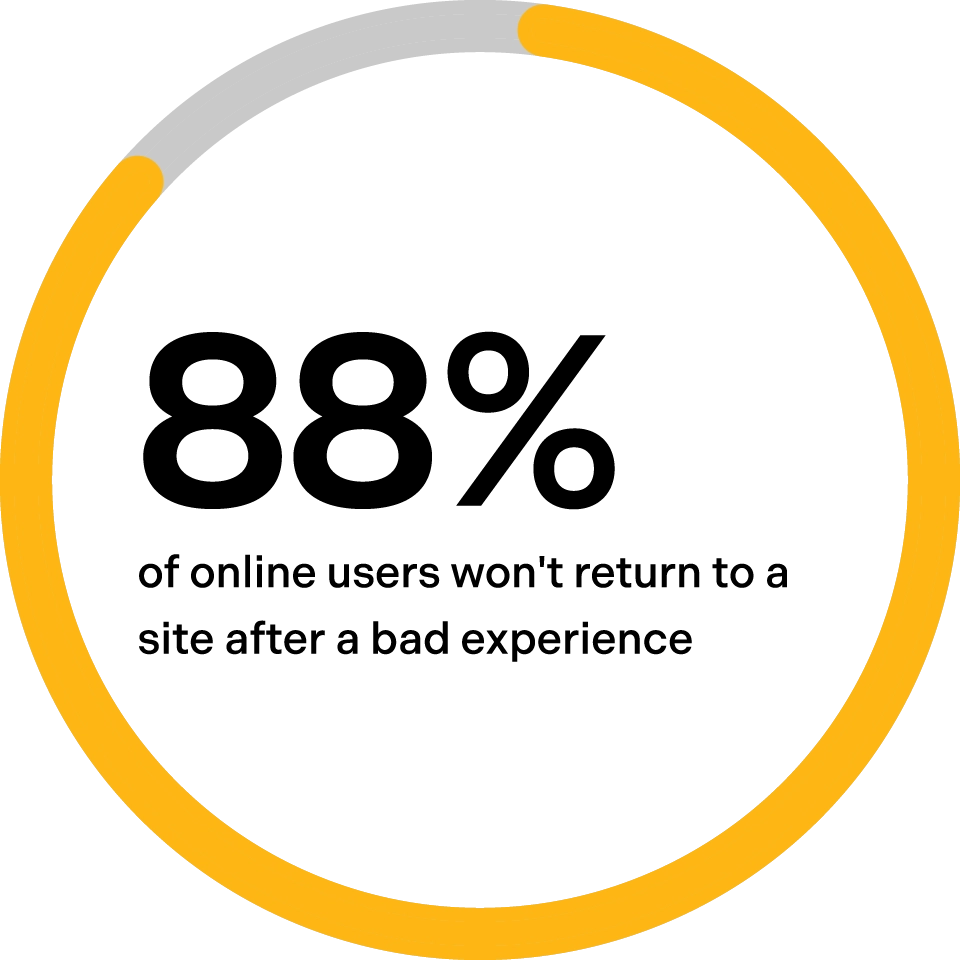
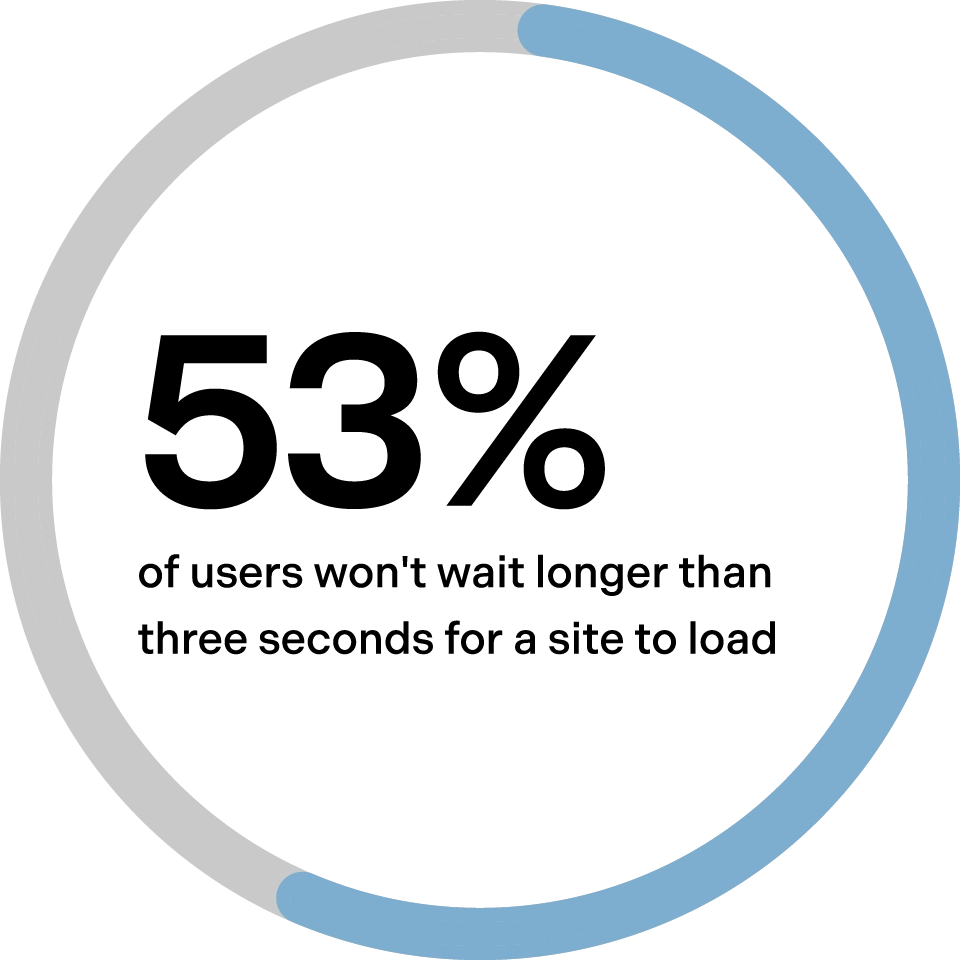
Based on top website statistics gathered by the Forbes Advisor Team in 2025, 88% of online users won’t return to a site after a bad experience, and 53% of users won’t wait longer than three seconds for a website to load. Both of these things can be prevented with regular maintenance.
Think about it: have you ever been searching online for information only to land on a 404 “Page Not Found” error? It's not exactly a confidence booster. Instead, you're probably left wondering if the website is up to date, and you take your business elsewhere.
The cost of preventing these issues is far lower than the cost of an emergency bill to fix them.
what to do if you’ve fallen behind on website maintenance
If you’ve fallen behind on website maintenance or would just like to know where you stand, a web audit might be the right fit for you. We offer web audit packages that provide insight into a website's health so improvements can be made if needed. Using a scoring system, we assess your site across five key categories and provide a detailed report with findings and recommended updates for each area:
- Content quality
- Code health
- Site speed
- Mobile friendliness
- Ease of use & navigation
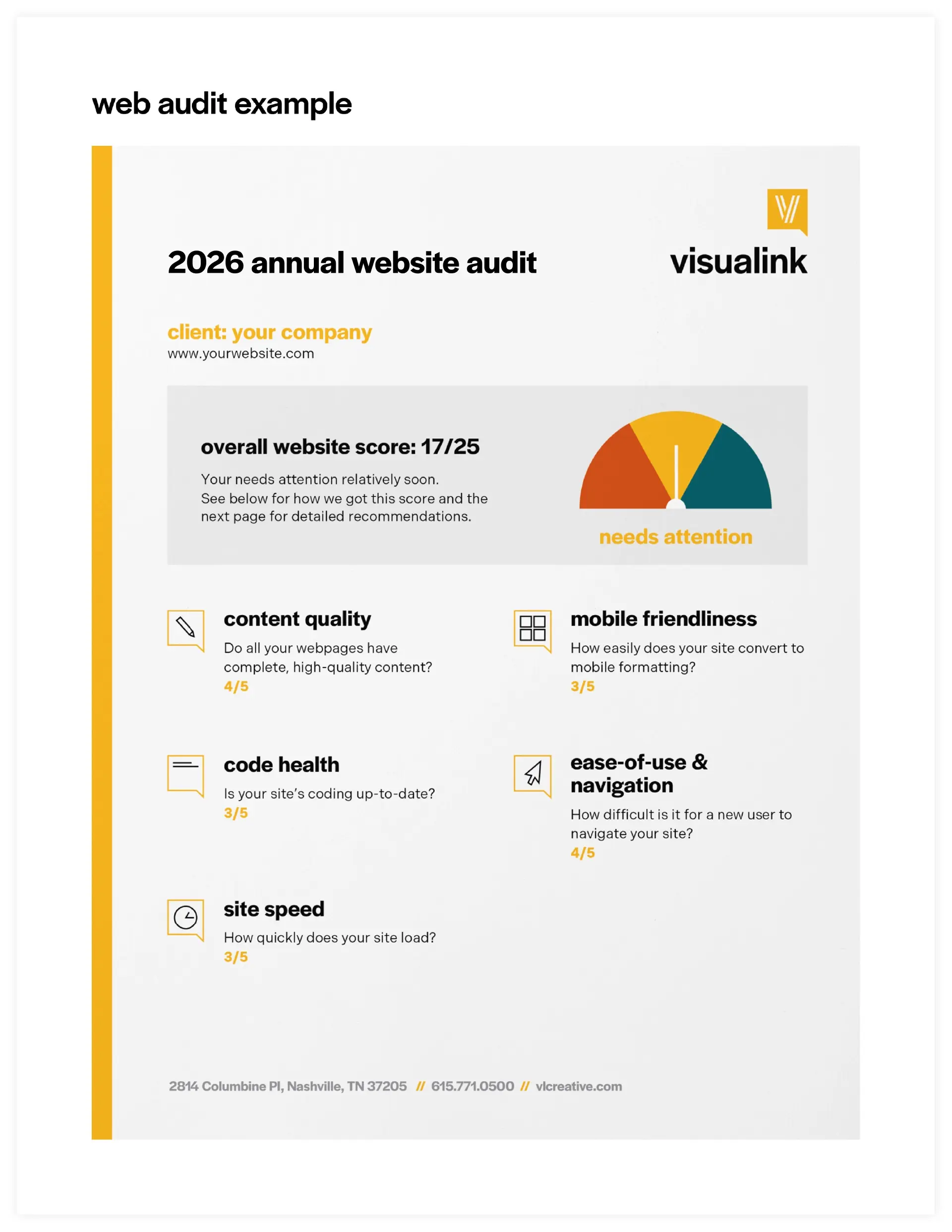
If you’re interested in scheduling a web audit for your website, contact us, and we will be in touch with more information.
diy website maintenance vs. professional support
Some basic maintenance can be managed yourself if you are familiar with your website’s CMS (content management system); however, doing it all yourself can cause some tasks to be overlooked that require more technical expertise.
This is where professional support can add significant value. Here are our recommendations for what you can update yourself versus what you need support for.
DIY Maintenance:
- Small content updates
- Copy updates
- Swapping and adding images (Be cautious here, though. Improperly sized images or large file sizes could affect the site design and page load time.)
- Keeping downloadable resources up to date
- Updating broken links
- Viewing traffic analytics
Professional Support:
- Managing plugin and platform updates
- Performance testing
- Security monitoring
- UI design updates
- Navigation and site structure changes
- Annual web audits to spot vulnerabilities before they turn into something harmful
Most agencies offer ongoing maintenance packages. Partnering with our team lets you rest easy knowing your site is properly maintained.
website maintenance for different business types
Website maintenance might look a little different depending on your business type, so we’ve included some examples to help you visualize what to expect.
Local businesses such as restaurants and retailers can expect to update menu and inventory offerings, business hours, and promotions that might draw business to their physical location.
Service-based businesses, like marketing and design agencies, can expect ongoing updates to their portfolio, service offerings, and blog posts. Providing case studies and educational information helps reach new customers.
E-commerce companies can expect product and inventory updates and frequent security checks to ensure payment platforms are up to date and secure.
Enterprise companies with large-scale operations and multiple locations, such as homebuilders, can expect to update project image galleries to showcase new homes.
how often does website maintenance need to happen?
For most businesses, a combination of daily, weekly, monthly, quarterly, and annual tasks provides a strong foundation. It sounds like a lot, but many of the frequent tasks are automated and only need attention if there is a problem. Here’s our recommendation of where to start:
Daily Automated Tasks
- Automated backups
- Automated security scans
Weekly Checks
- Automated uptime monitoring
Monthly Reviews
- Platform and plugin updates
- Content updates and checking for broken links
Quarterly Audits
- Performance updates
- SEO updates such as adding new blog posts and adding internal linking
- Strategy updates if there are larger changes to your business that might affect the flow of information
- Review analytics to see traffic
Annual Deep Dives
- Review accessibility and ensure ADA compliance is met
- Complete site enhancements or major updates
- Complete website audit
choosing the right web maintenance plan for you
Bottom line: maintenance is not an expense; it's an investment. And an essential one, at that. Just as you would protect your car beyond driving off the lot, protect your website beyond launch. Consistent website maintenance ensures your site continues to work hard for your business, day after day.
As we mentioned in How to Plan for a New Website, a successful website requires an ongoing investment of time. Regular maintenance protects the work you've already put into creating it.
At Visualink, we offer options for web maintenance:
- Pay-as-you-go: You pay only for the hours worked on your website, but that may come at a higher cost with longer wait times as your task is added to the regular workflow queue.
- Web maintenance & improvement plans: This is a partnership where you agree to a customized website maintenance plan that includes monthly scheduled updates and improvements.
Learn more about our services or start a conversation about which web maintenance support is right for you. Just fill out our interest form, and we’ll be in touch.